Retrieve knowledge with sources
The agent asks for company knowledge in the relevant room. NomOS returns an answer and its available supporting sources within the agent’s access rights. The agent can inspect a cited passage directly.
NomOS
With NomOS, teams and AI agents put your company’s knowledge to work. Through MCP, agents retrieve applicable decisions, request checks on planned actions and submit new findings. Reviewed results remain available for the next task.
For teams using coding agents in their everyday work.
NomOS for AI agents
Retrieve knowledge, check policies and submit results for review. Connected agents can use these capabilities through MCP.
The agent asks for company knowledge in the relevant room. NomOS returns an answer and its available supporting sources within the agent’s access rights. The agent can inspect a cited passage directly.
Decisions, their status and relationships are available as structured records. The agent can inspect the basis for an earlier decision.
Agents submit knowledge and decision proposals for review. Responsible people decide what is adopted or becomes binding.
NomOS assesses a submitted action against applicable policies and identifies required approvals. The call returns that assessment to the agent.
Coding agents + NomOS
The agent retrieves the current policy from NomOS. Your team reviews the proposal. The recorded decision helps with the next task.
In your development environment
Approved project context
Example: Export policy, version 3
The applicable policy is visible before the proposed change.
In your development environment
Approved project context
Approval by the responsible person
Technical permission replaces neither code review nor business approval.
In your development environment
Approved project context
Exceptions do not automatically become rules
The rationale for the organisation boundary does not need to be found again. The new code and applicability still need review.
Illustrative workflow. MCP (Model Context Protocol) connects the agent to NomOS.
Technical action controls require integration of the execution path as well.
Understand integration and control levels ↗Inside NomOS
Your team can use the shared knowledge directly, too. Here, NomOS answers an architecture question using an earlier decision.
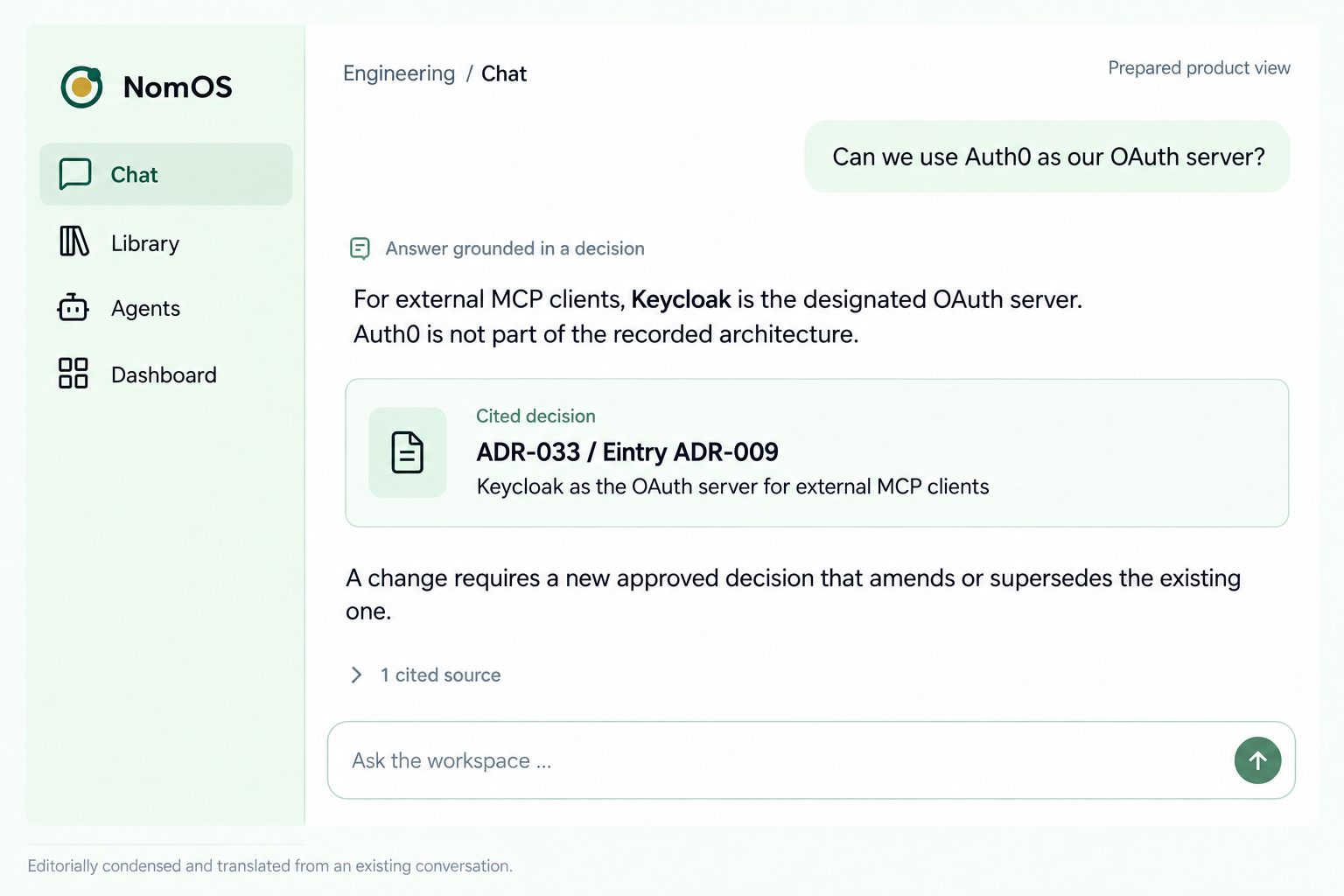
For the OAuth server, NomOS names the solution already selected: Keycloak.
The answer refers to the record containing the underlying architecture decision.
Choosing a different solution requires a new or amended approval.
Reuse knowledge
Finding sources, understanding context and reviewing answers takes time and compute. NomOS retains reviewed results with their sources and scope, so others can build on them.
Previous results and their rationale are available for the next task. Your team checks what remains valid and applies to the new case.
Employees work in NomOS. Connected agents access the same knowledge from their existing tools.
Reusing knowledge can reduce repeated research and model work. The pilot compares this benefit with the effort of retrieval, review and maintenance.
Platform outlook
NomOS connects company knowledge, policies and decisions. Our vision is to make this foundation available wherever employees and AI agents work.
Windows & macOS
Control AI access at the desktop
A locally installed tool is planned to check connected AI access and agent actions against policies defined in NomOS, allowing or stopping them as appropriate.
Ainomos
Coordination and decision centre
Company knowledge, policies and reviewed decisions come together here. Your organisation defines what applies and who may decide.
Mobile access
Use knowledge. Make decisions.
Access company knowledge according to your role and permissions. Receive notifications about pending cases, review their basis and approve or reject them.
An agent wants to export customer data. The required approval is missing.
The policy, data scope and rationale are presented to the responsible role for a decision.
They receive a notification and review the case. The decision returns to NomOS; NomGate applies it to the requested action.
The reviewed decision remains in NomOS. A later case can build on it where it still applies.
Coding agents can access NomOS through MCP. Employees can use NomOS web chat. We check which functions your specific tool supports during integration.
Explore integrations ↗Your subject-matter owners review sources, approve decisions and keep them current. Your IT team configures access and integrations. NomOS makes this foundation available to teams and agents.
See how it works ↗NomOS checks access rights and can assess submitted actions against policies. That alone does not technically stop an external action. Its execution path must be integrated for this. NomGate is planned to add control at the desktop.
Explore control levels ↗NomOS is planned for SaaS and operation on your own infrastructure. We agree hosting, model providers and data processing against your requirements before use.
Explore operating models ↗The 30-day pilot
In our first conversation, we look at your task and your team’s tools. If NomOS fits, we agree a 30-day pilot covering two specific workflows.
Along with relevant sources and the people who know the workflow and make its decisions.
Sources, policies and the integrations you need. We agree scope, a fixed price and evaluation criteria before starting.
Compare preparation time, quality, review effort and ongoing maintenance with your current approach.
Leave your contact details. We will get in touch for an initial conversation.
From October 2026, NomOS enters production use with selected customers. Ainomos supports the rollout for both SaaS and Self-Hosted. General availability (GA) follows in March 2027.